# 华东师范大学软件学院实验报告
| **实验课程:** 计算机网络 | **年级:** 2024 | **实验成绩:** |
| :-------------------------------- | :--------------------- | :------------------------ |
| **实验名称:** Socket Programming | **姓名:** | **实验日期:** 2025.01.03 |
| **实验编号:** 7 | **学号:** | **实验时间:** 2学时 |
## 一、实验目的
了解套接字编程相关内容。
## 二、使用内容与实验步骤
使用实验手册中所给出的示例代码,并进行相关测试。
## 三、实验环境
- 实验仪器1:ThinkPad X230i
- 操作系统:6.12.9-arch1-1 x86_64 GNU/Linux
- 以太网控制器:Intel Corporation 82575LM Gigabit Network Connection
- 网络控制器:Realtek Semiconductor Co., Ltd. RTL8188CE 820.11b/g/n WiFi Adapter
- 实验仪器2:raspberrypi 4B
- 操作系统:6.6.47+rpt-rpi-v8 aarch64 GNU/Linux
- 网络连接:宿舍 Wifi
## 四、实验过程与分析
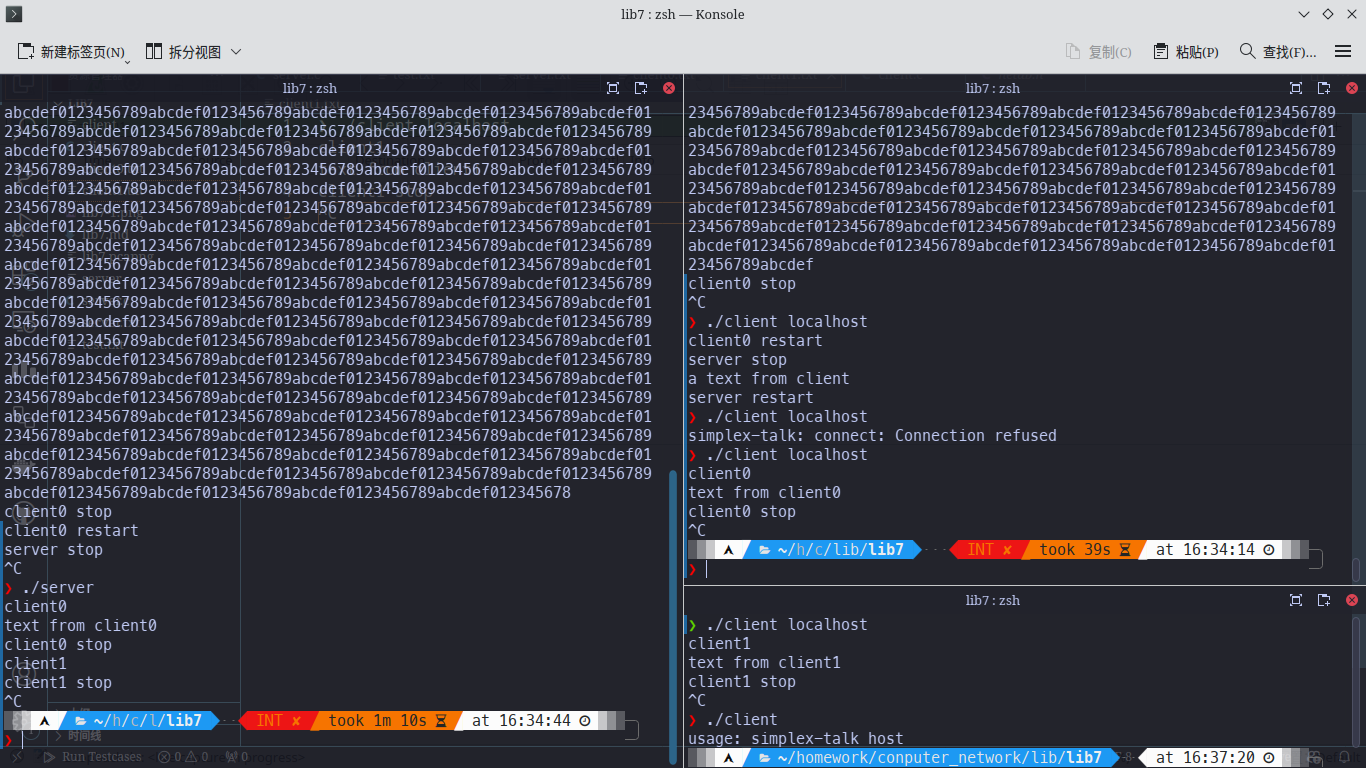
本地测试记录如下图:
实验步骤
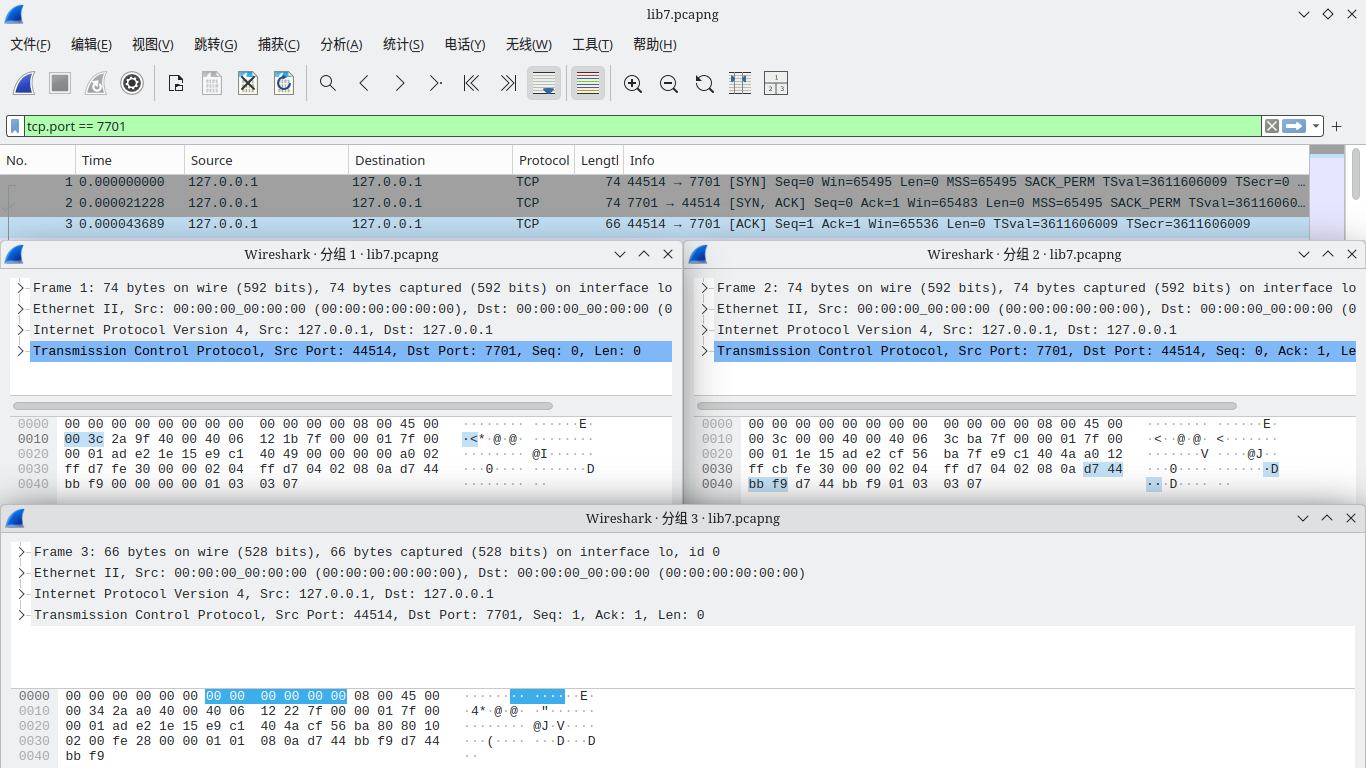
1. 启动 Wireshark,根据代码中常量定义,将过滤选项设置为`tcp.port==7701`,对 `Loopback: lo` 进行捕获
2. 启动服务端
3. 启动0号客户端,此时 Wireshark 捕获到三次握手包,观察到0号客户端采用44514端口:
4. 发送文本测试
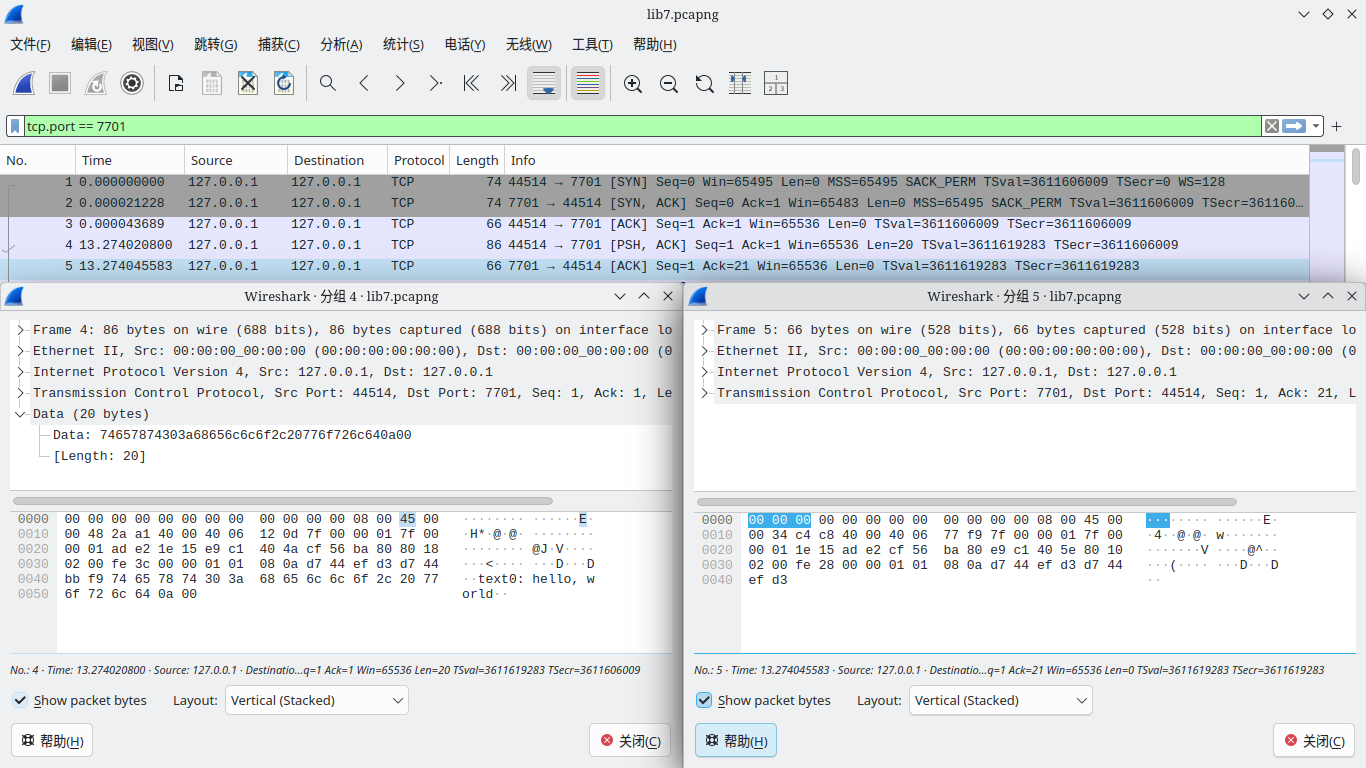
1. 0号客户端发送测试文本0(测试短文本):`text0:hello, world`,服务端显示:`text0:hello, world`,正常发送,Wireshark 捕获到的包信息如下。
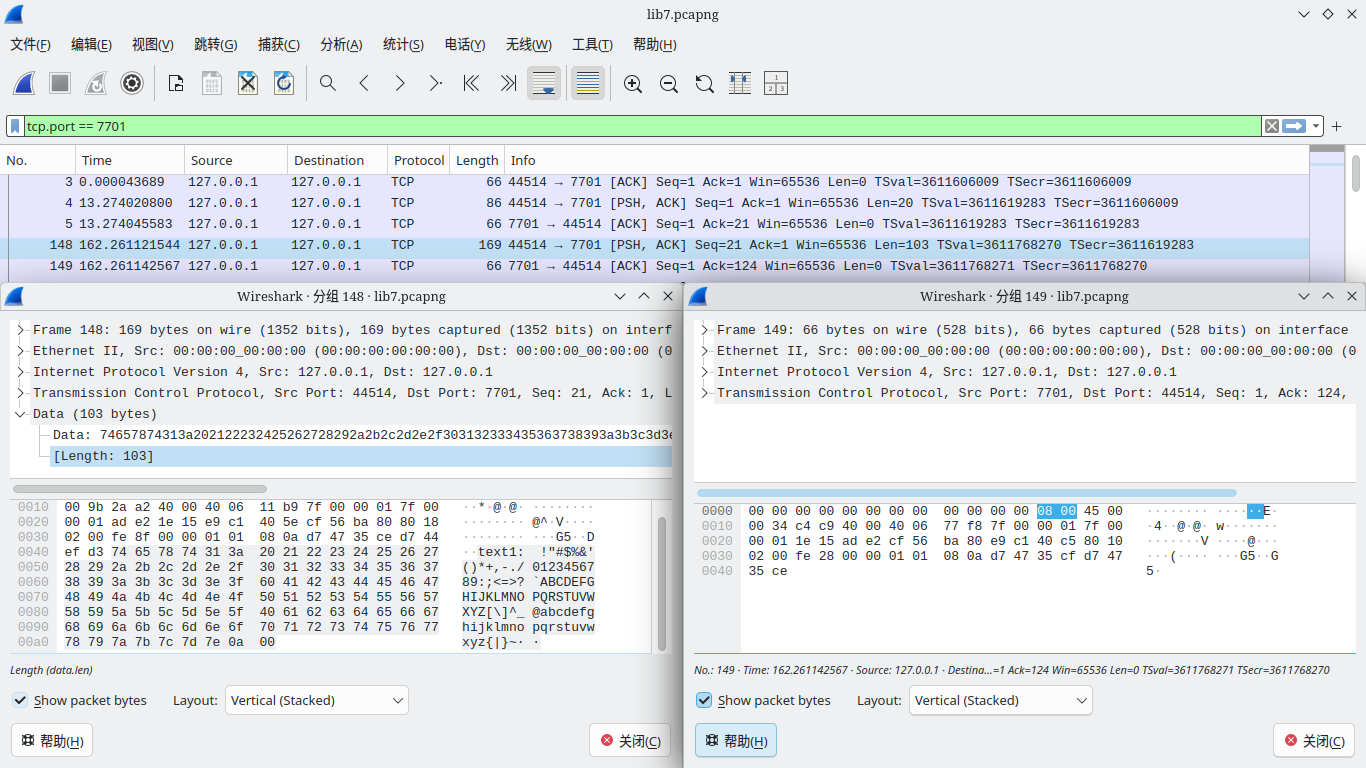
2. 0号客户端发送测试文本1(测试ACSII可显示字符):text1: ``!"#\$%&'()*+,-./0123456789:;<=>?`ABCDEFGHIJKLMNOPQRSTUVWXYZ[\]^_@abcdefghijklmnopqrstuvwxyz{|}~``,服务端显示:text1: ``!"#\$%&'()*+,-./0123456789:;<=>?`ABCDEFGHIJKLMNOPQRSTUVWXYZ[\]^_@abcdefghijklmnopqrstuvwxyz{|}~``,正常发送,Wireshark 捕获到的包信息如下。
3. 0号客户端发送测试文本2(测试tab字符):`text2:\t \t`,服务端显示:`text2:\t \t`,正常发送,Wireshark 捕获到的包信息如下。
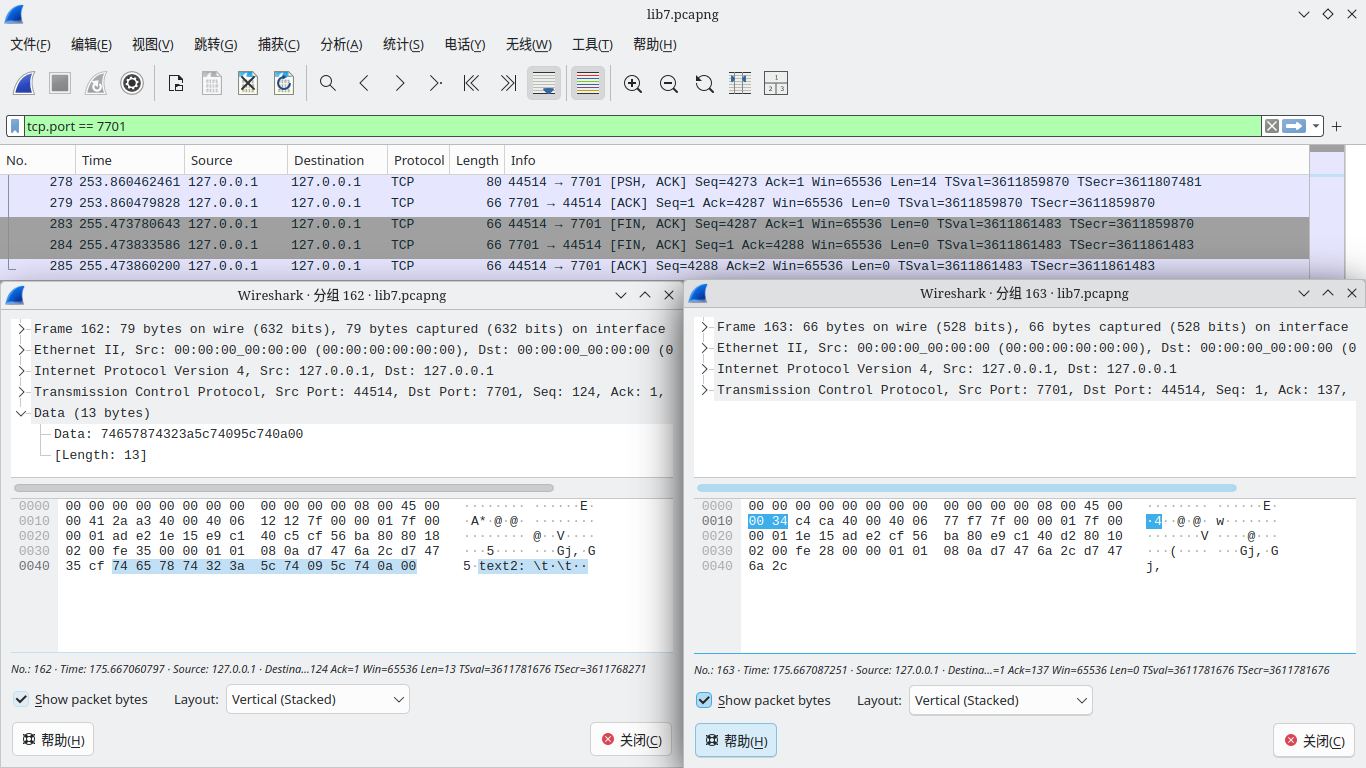
可以观察到 tab 以正常形式(ACSII码为9)发出
4. 0号客户端发送测试文本3(测试中文文本):`text3:你好,世界`,服务端显示:`text3:你好,世界`,正常发送,Wireshark 捕获到的包信息如下。
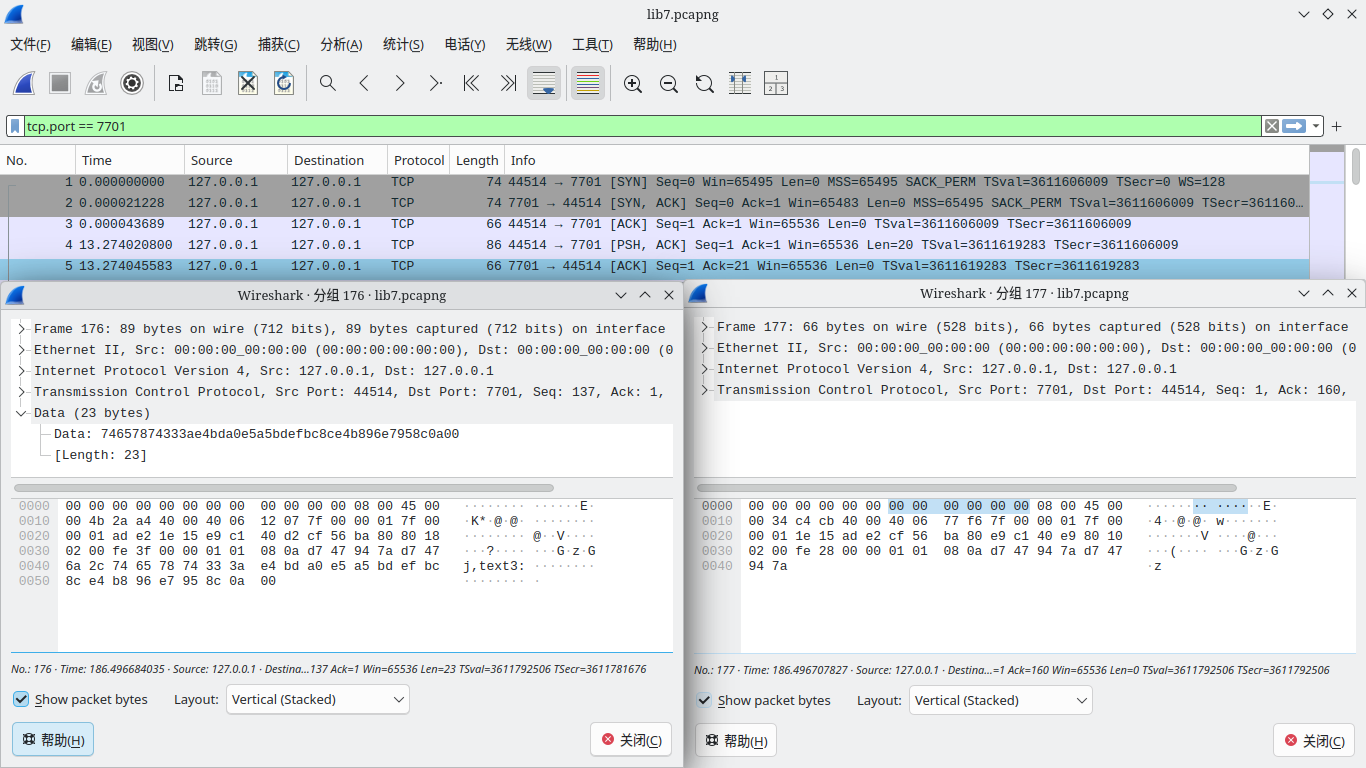
5. 0号客户端发送测试文本4(测试长文本):`text4:0123456789abcdef...0123456789abcdef`(共计32774字节),服务端显示:`text4:0123456789abcdef...012345678`(共计4096字节),文本发送不正常,仅发送前 4096 字节,检查 Wireshark ,可以发现0号客户端共发送16个包,前15个包中每个包携带255字节的文本,最后一个包携带16字节的文本,捕获到的第一个与最后一个客户端包信息如下。
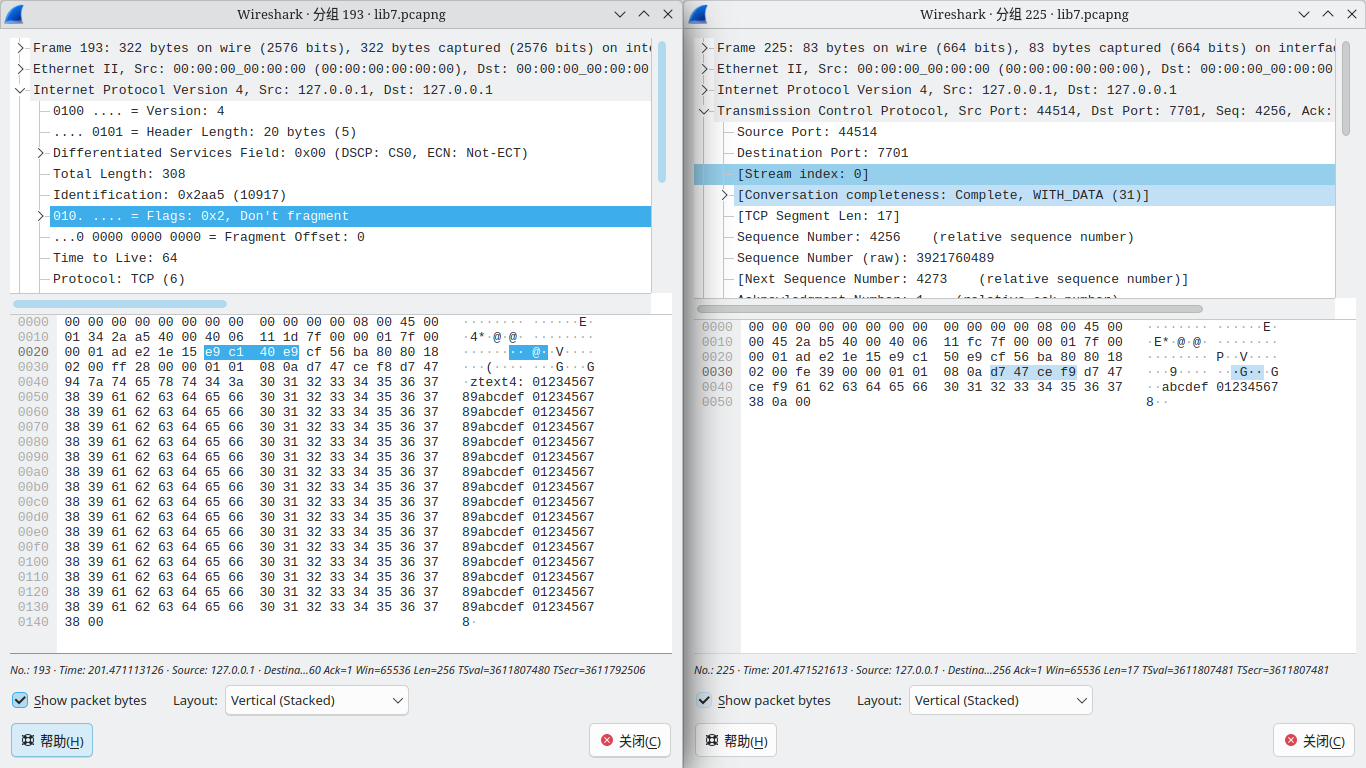
可以观察到 IP 协议头中 DF 为 1 ,故数据未经 IP 分片,数据的分段发生在 TCP 加工阶段。
5. 断连测试
1. 断开0号客户端连接,捕获到由0号客户端发出的结束请求
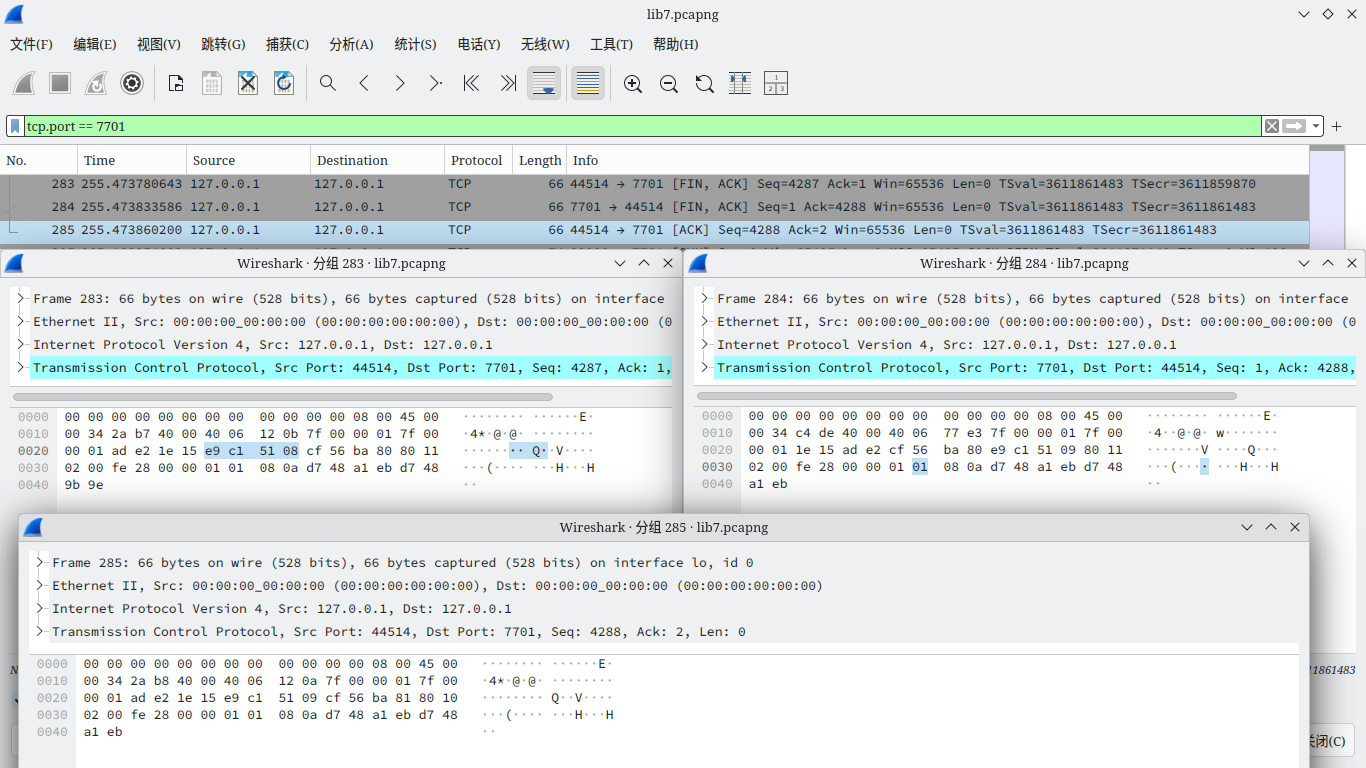
2. 重新恢复0号客户端连接
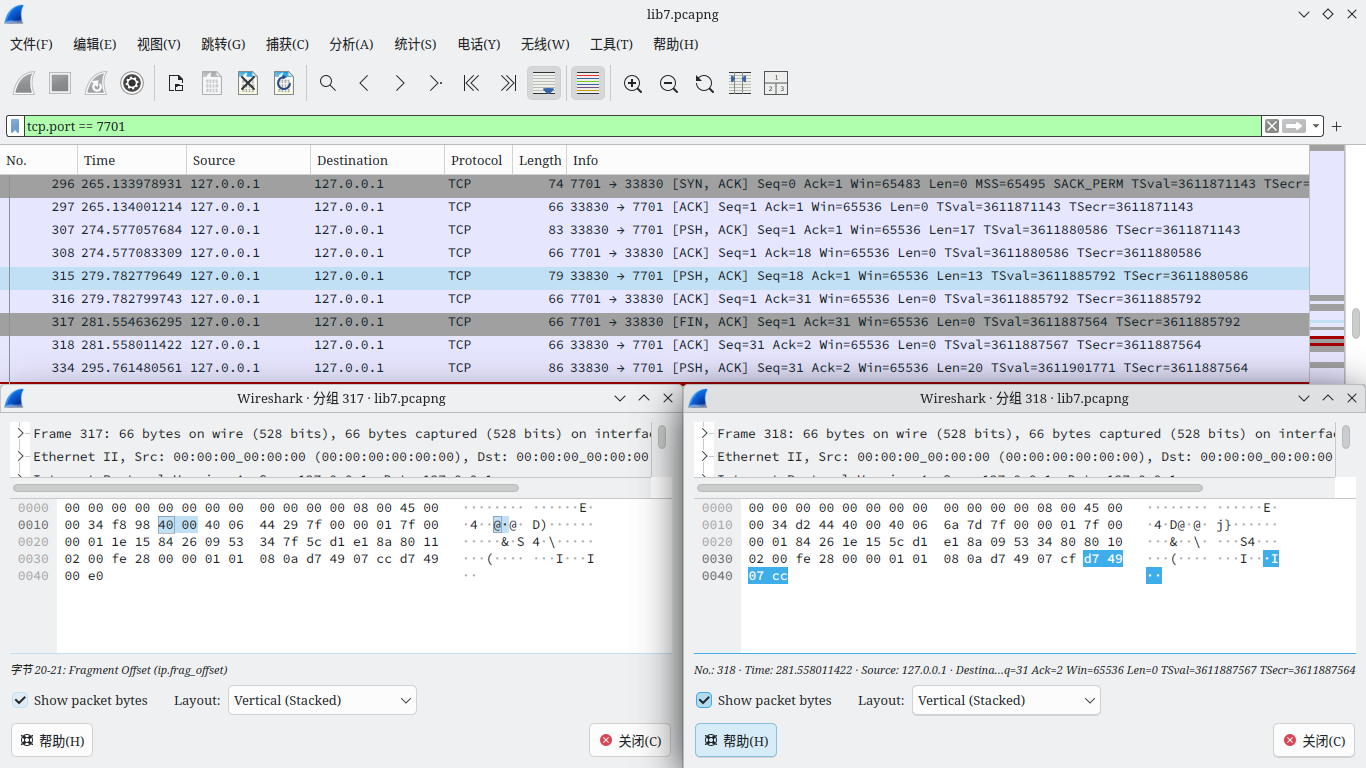
3. 断开服务端连接,捕获到由服务端发出的结束请求(FIN),0号客户端发送ACK确认,但未得到服务端的ACK确认,于是0号客户端将在等待2MSL后自动断开连接,捕获到的包信息如下:
4. 0号客户端发送文本`a text from client`, Wireshark 捕获到的内容如下
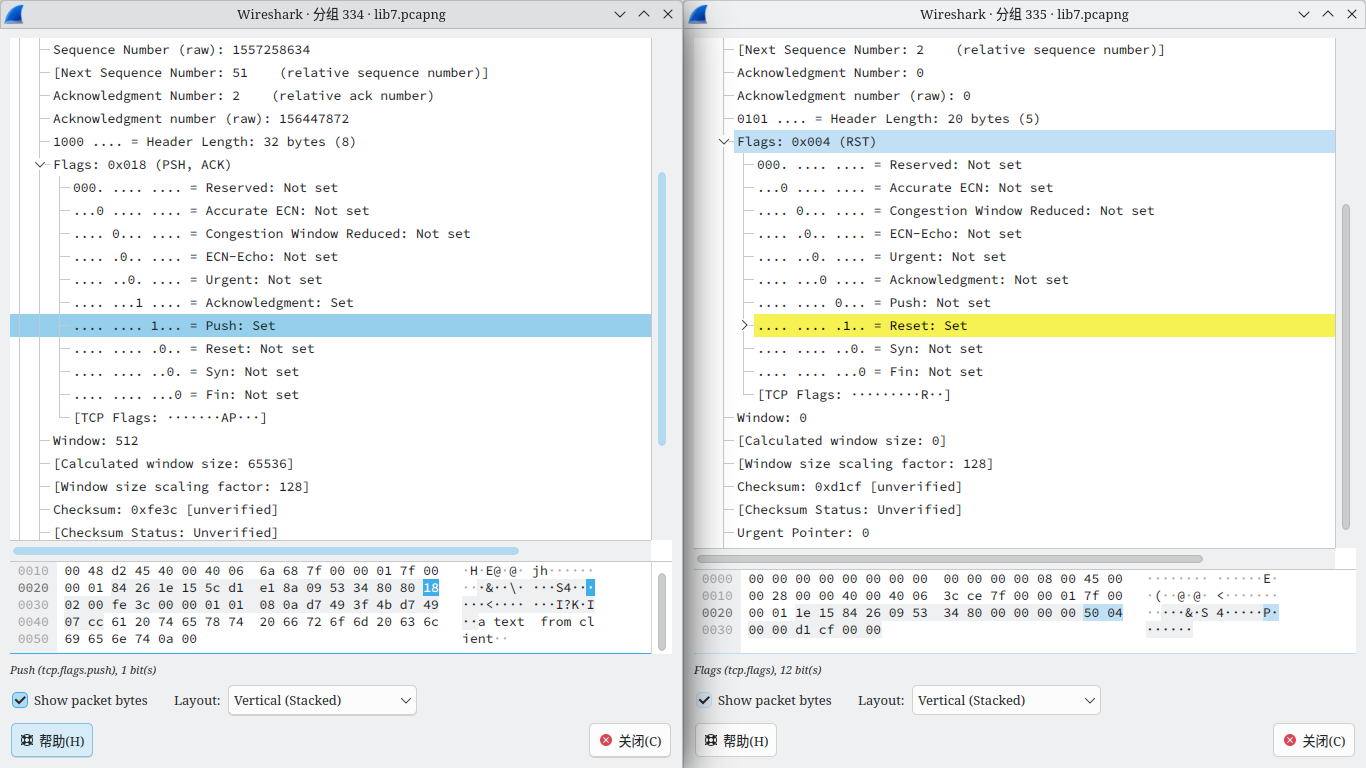
0号客户端发送了带有 PSH 的信息包,端口收到后优先处理该数据包,由于服务端已经关闭,7701端口空闲,故返回带有RST的数据报。
5. 0号客户端发送文本`server restart`,按下回车后客户端自动退出,Wireshark 没有捕获到消息
6. 执行指令`./client localhost`,尝试重新启动客户端,收到报错`simplex-talk: connect: Connection refused`,捕获到的包信息如下
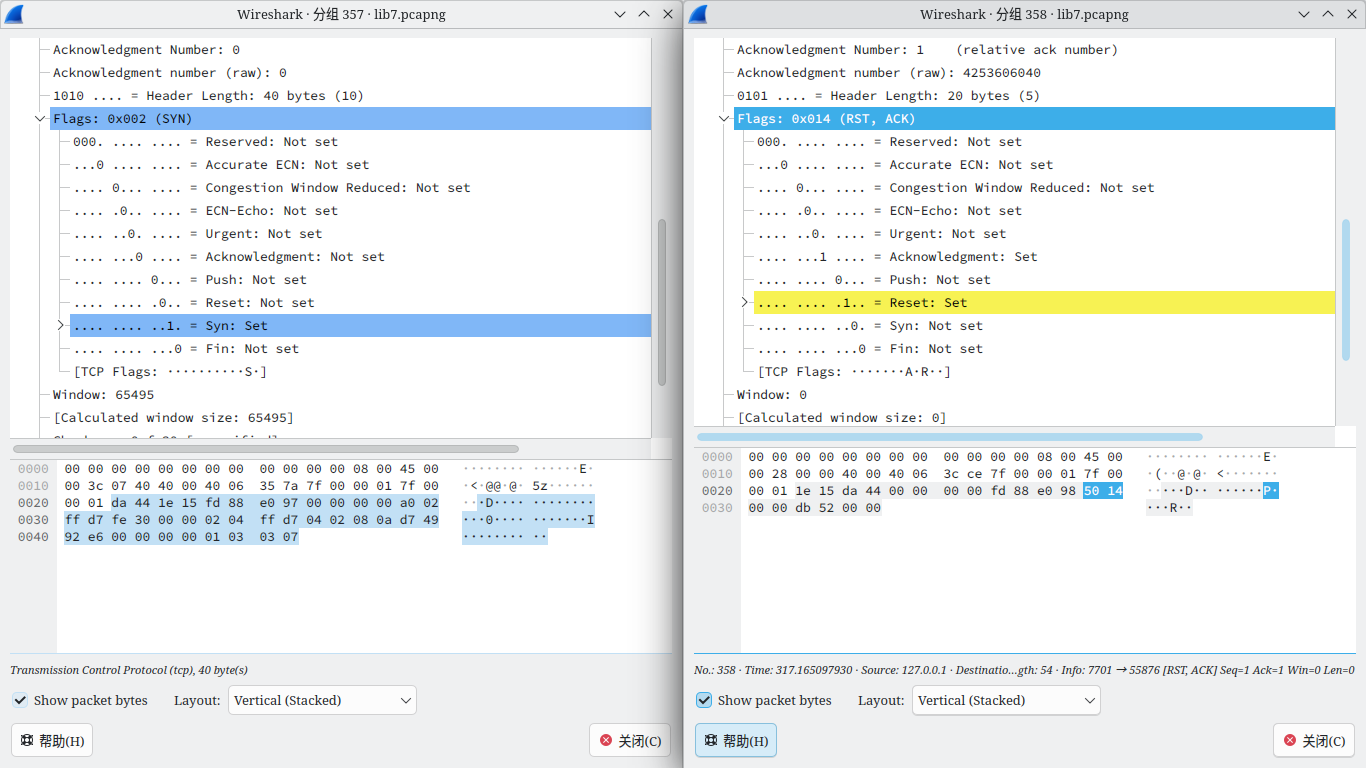
0号客户端发送了带有 SYN 的信息包,由于服务端已经关闭,7701端口空闲,故返回带有RST的数据报,0号客户端收到后报告错误并退出
7. 执行指令`./client`,不指定地址,报错`usage: simplex-talk host`
6. 多客户端测试
1. 重新启动服务端
2. 启动0号客户端,观察 Wireshark ,可以发现0号客户端使用端口为53092
3. 0号客户端发送文本`client0`,服务端显示:`client0`,正常发送。
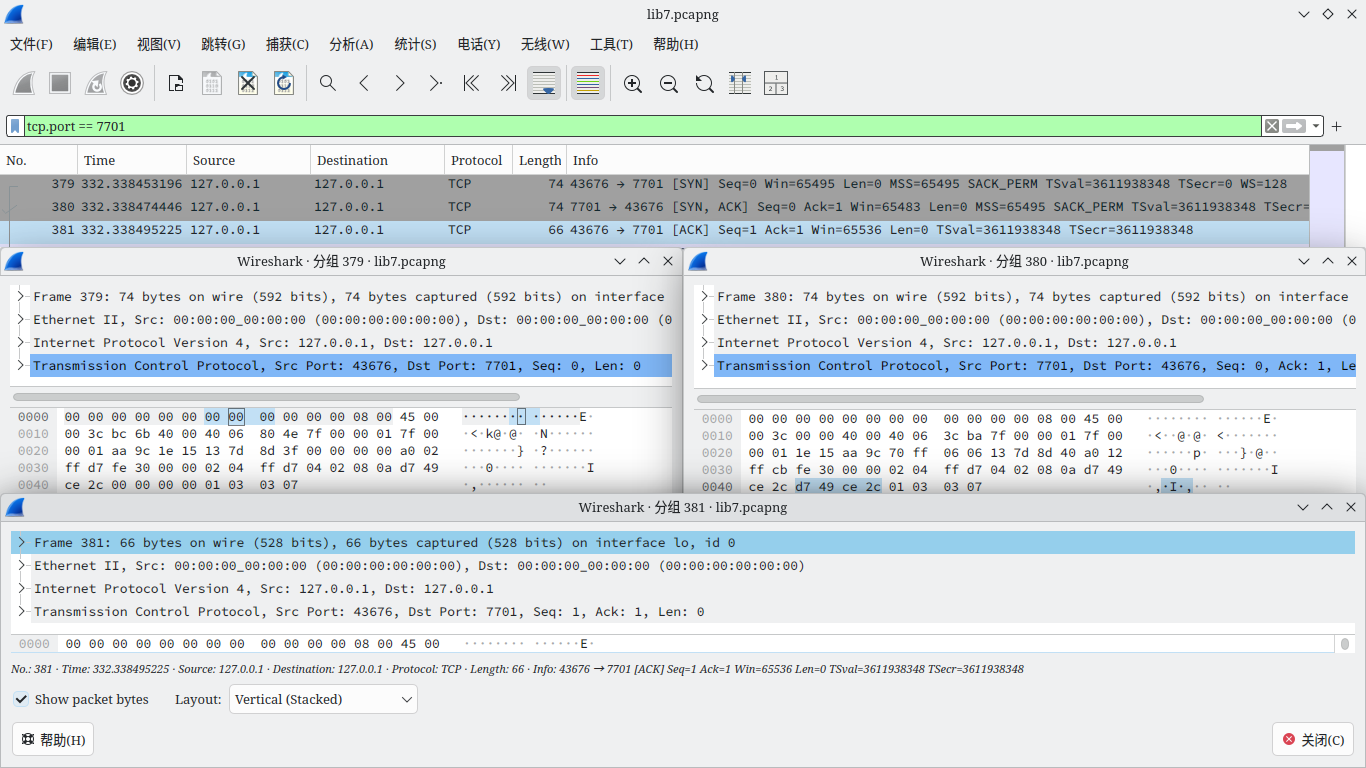
4. 启动1号客户端,观察 Wireshark ,可以发现1号客户端使用端口为43676,Wireshark 捕获包信息如下:
5. 1号客户端发送文本`client1`,服务端没有显示,但 Wireshark 捕获到信息包。
6. 0号客户端发送文本`text from client0`,服务端显示`text from client0`,正常发送。
7. 1号客户端发送文本`text from client1`,服务端没有显示,但 Wireshark 捕获到信息包。
8. 0号客户端发送文本`client0 stop`,服务端显示`client0 stop`,正常发送。
9. 0号客户端断开连接,服务端显示`client1`
10. 0号客户端发送文本`client1 stop`,服务端显示`client1 stop`,正常发送。
11. 断开服务端连接。
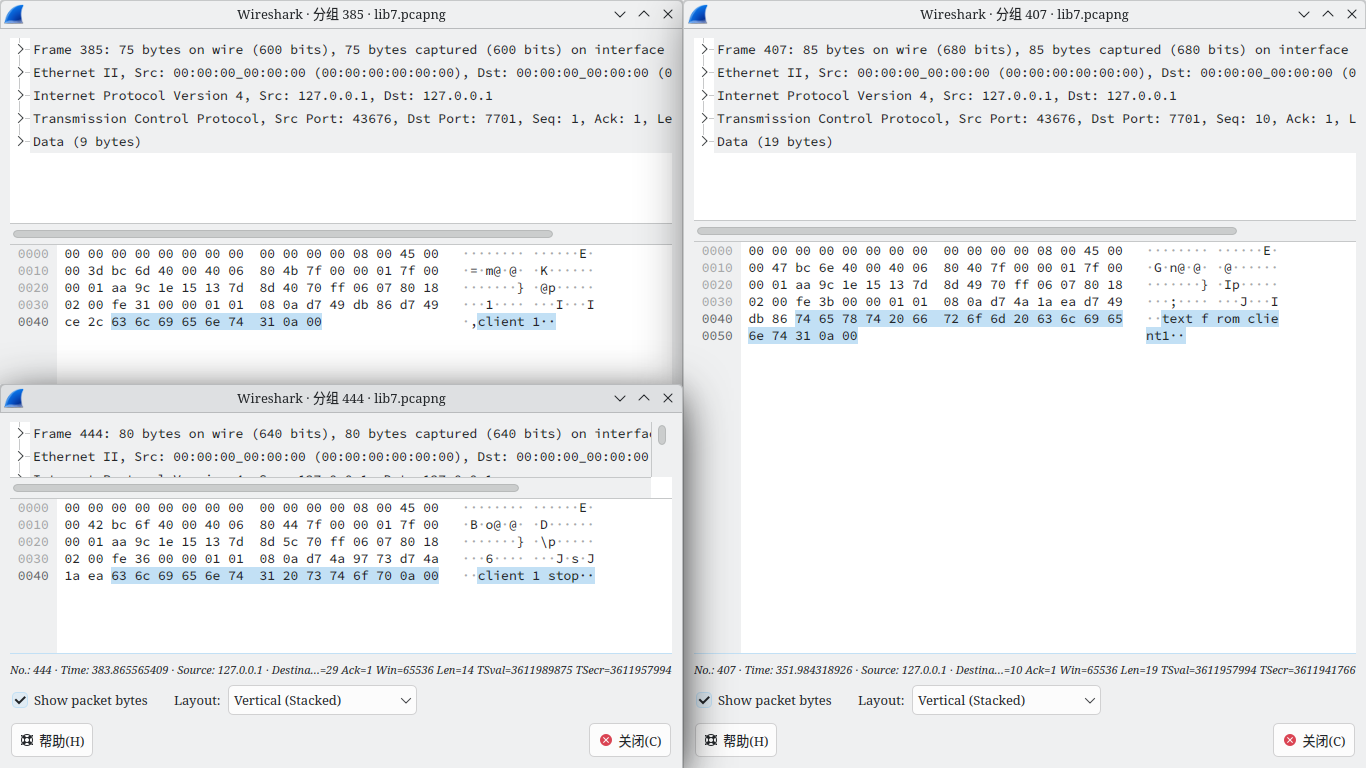
1 号客户端发送的三个携带文本的信息包如下:
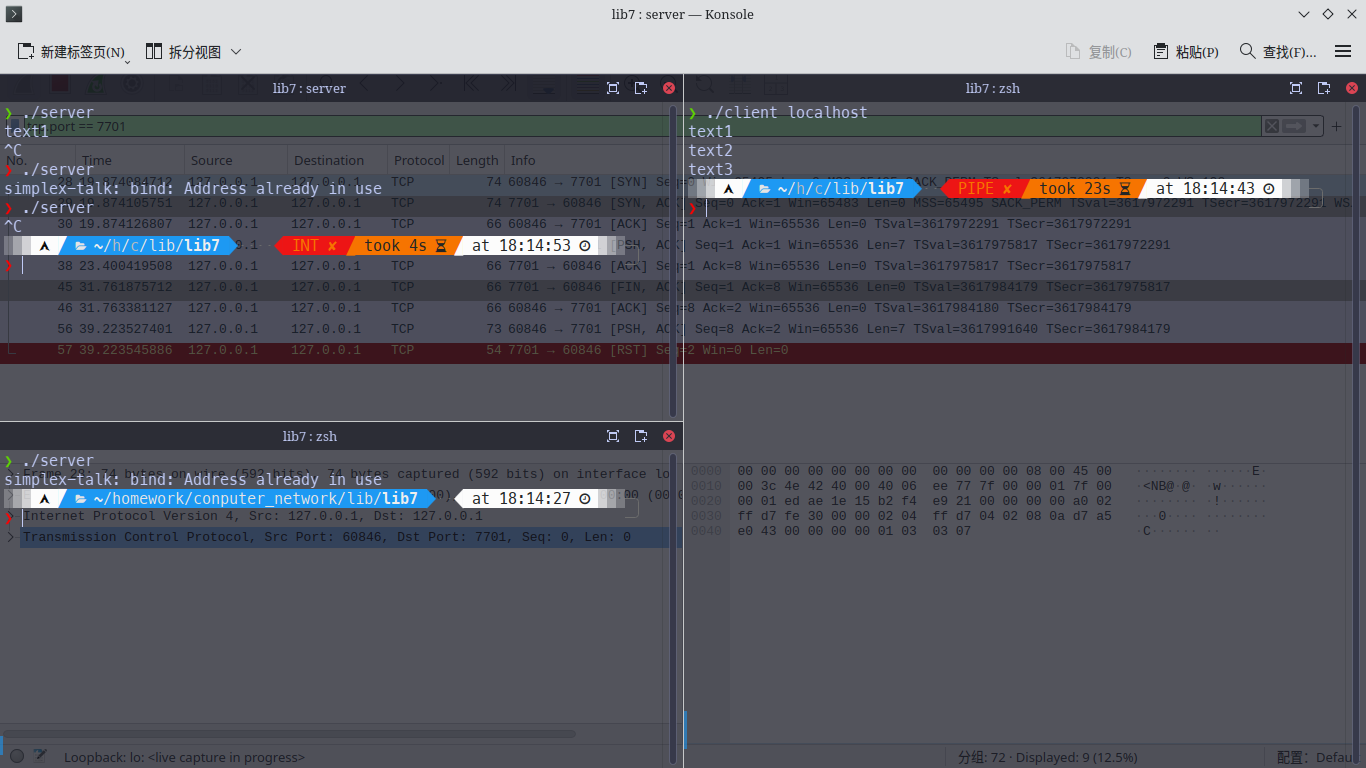
7. 端口占用测试
1. 启动服务端,Wireshark 未捕获到内容
2. 启动第二个服务端,报错`simplex-talk: bind: Address already in use`,Wireshark 未捕获到内容
3. 启动客户端
4. 关闭服务端
5. 尝试重新启动服务端,报错`simplex-talk: bind: Address already in use`,Wireshark 未捕获到内容
6. 客户端退出
7. 尝试重新启动服务端,服务端正常运行
测试截图如下:
8. 局域网通信测试
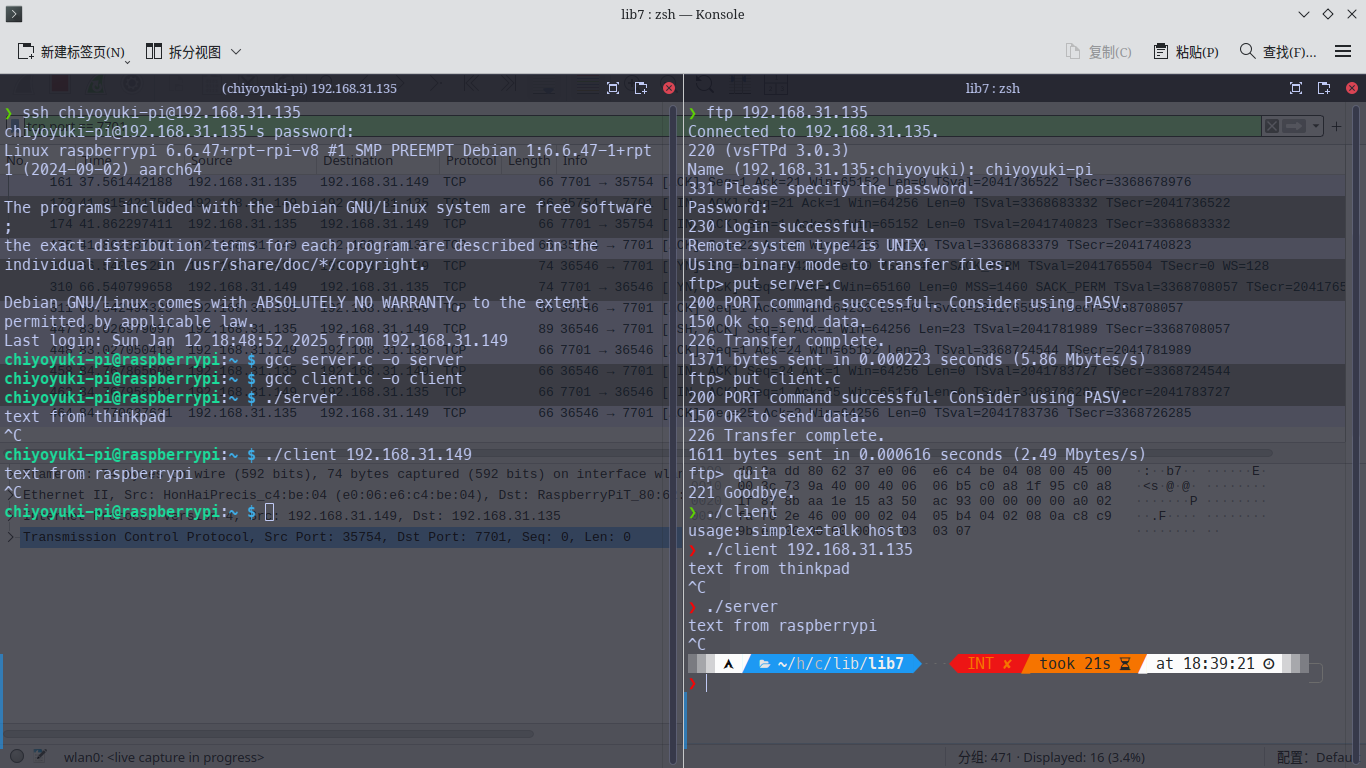
1. 通过 ssh 连接并控制同一局域网下的另一设备
2. 通过 ftp 上传源代码server.c与client.c
3. 在 ssh 所控制设备上编译
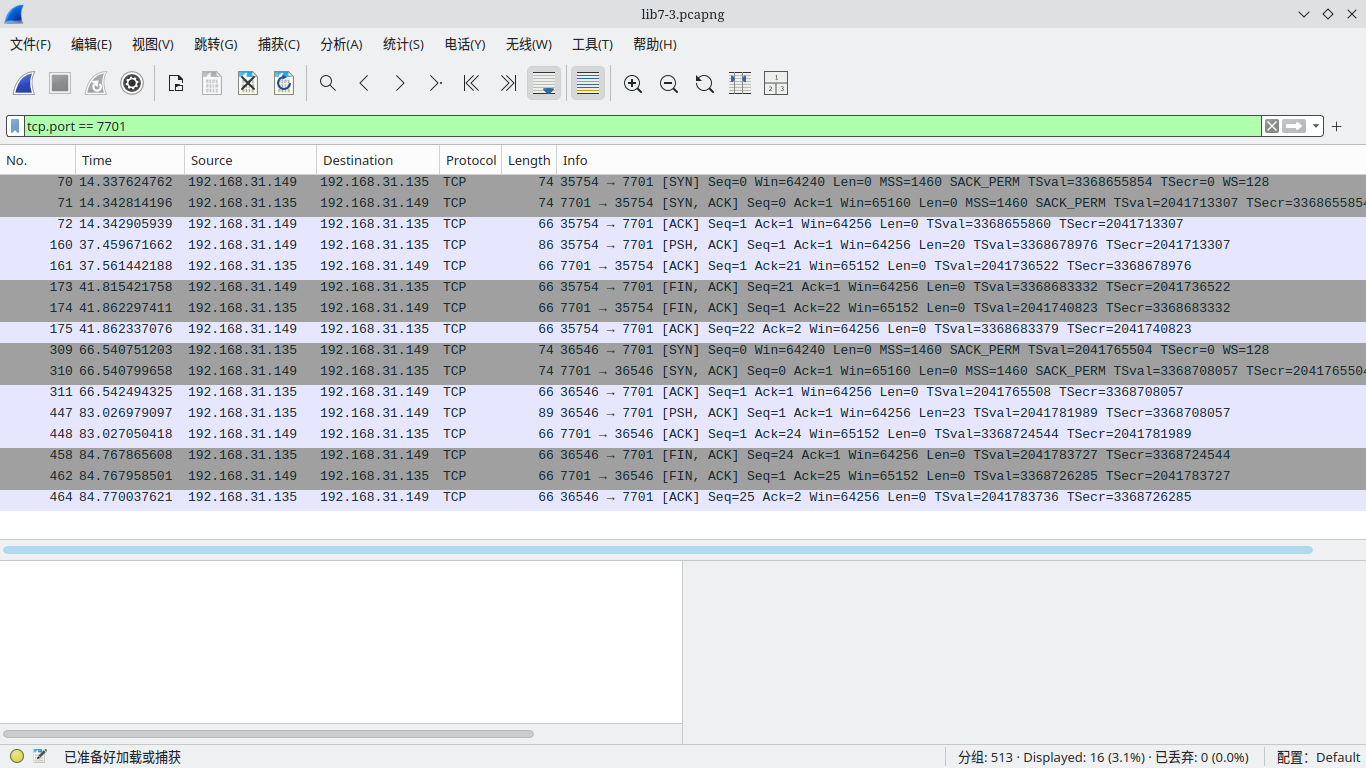
4. 启动 Wireshark ,将过滤器设置为`tcp.port == 7701`,对wlan0进行捕获
5. 在远程主机上执行`./server`,在电脑上执行`./client 192.168.31.135`,成功连接
6. 在客户端上发送信息,远程服务端成功收到
7. 交换客户端与服务端,仍能成功通信
通信记录与 Wireshark 捕获截图如下:
## 五、附录
客户端代码如下:
```c
/* Source: Peterson & Davie (2007), Computer Networks, a Systems Approach,
* 4th ed., Morgan Kaufmann, p. 34-35.
* Included stdlib.h, string.h, and strings.h so it compiles on Linux.
* Changed port from 5432 (postgresql) to 7701 (unassigned).
* - JLND Feb 7 2009
*/
#include
#include
#include
#include
#include
#include
#include
#include
#include
#include
#define SERVER_PORT 7701
#define MAX_LINE 256
int
main(int argc, char * argv[])
{
FILE *fp;
struct hostent *hp;
struct sockaddr_in sin;
char *host;
char buf[MAX_LINE];
int s;
int len;
if (argc==2) {
host = argv[1];
}
else {
fprintf(stderr, "usage: simplex-talk host\n");
exit(1);
}
/* translate host name into peer’s IP address */
hp = gethostbyname(host);
if (!hp) {
fprintf(stderr, "simplex-talk: unknown host: %s\n", host);
exit(1);
}
/* build address data structure */
bzero((char *)&sin, sizeof(sin));
sin.sin_family = AF_INET;
bcopy(hp->h_addr, (char *)&sin.sin_addr, hp->h_length);
sin.sin_port = htons(SERVER_PORT);
/* active open */
if ((s = socket(PF_INET, SOCK_STREAM, 0)) < 0) {
perror("simplex-talk: socket");
exit(1);
}
if (connect(s, (struct sockaddr *)&sin, sizeof(sin)) < 0) {
perror("simplex-talk: connect");
close(s);
exit(1);
}
/* main loop: get and send lines of text */
while (fgets(buf, sizeof(buf), stdin)) {
buf[MAX_LINE-1] = '\0';
len = strlen(buf) + 1;
send(s, buf, len, 0);
}
}
```
服务端代码如下:
```c
/* Source: Peterson & Davie (2007), Computer Networks, a Systems Approach,
* 4th ed., Morgan Kaufmann, p. 35-36.
* Included stdlib.h, string.h, and strings.h so it compiles on Linux.
* Changed port from 5432 (postgresql) to 7701 (unassigned).
* - JLND Feb 7 2009
*/
#include
#include
#include
#include
#include
#include
#include
#include
#include
#define SERVER_PORT 7701
#define MAX_PENDING 5
#define MAX_LINE 256
int
main()
{
struct sockaddr_in sin;
char buf[MAX_LINE];
int len;
int s, new_s;
/* build address data structure */
bzero((char *)&sin, sizeof(sin));
sin.sin_family = AF_INET;
sin.sin_addr.s_addr = INADDR_ANY;
sin.sin_port = htons(SERVER_PORT);
/* setup passive open */
if ((s = socket(PF_INET, SOCK_STREAM, 0)) < 0) {
perror("simplex-talk: socket");
exit(1);
}
if ((bind(s, (struct sockaddr *)&sin, sizeof(sin))) < 0) {
perror("simplex-talk: bind");
exit(1);
}
listen(s, MAX_PENDING);
/* wait for connection, then receive and print text */
while(1) {
if ((new_s = accept(s, (struct sockaddr *)&sin, &len)) < 0) {
perror("simplex-talk: accept");
exit(1);
}
while (len = recv(new_s, buf, sizeof(buf), 0))
fputs(buf, stdout);
close(new_s);
}
}
```